
1. Introduction to the Attitude Indicator
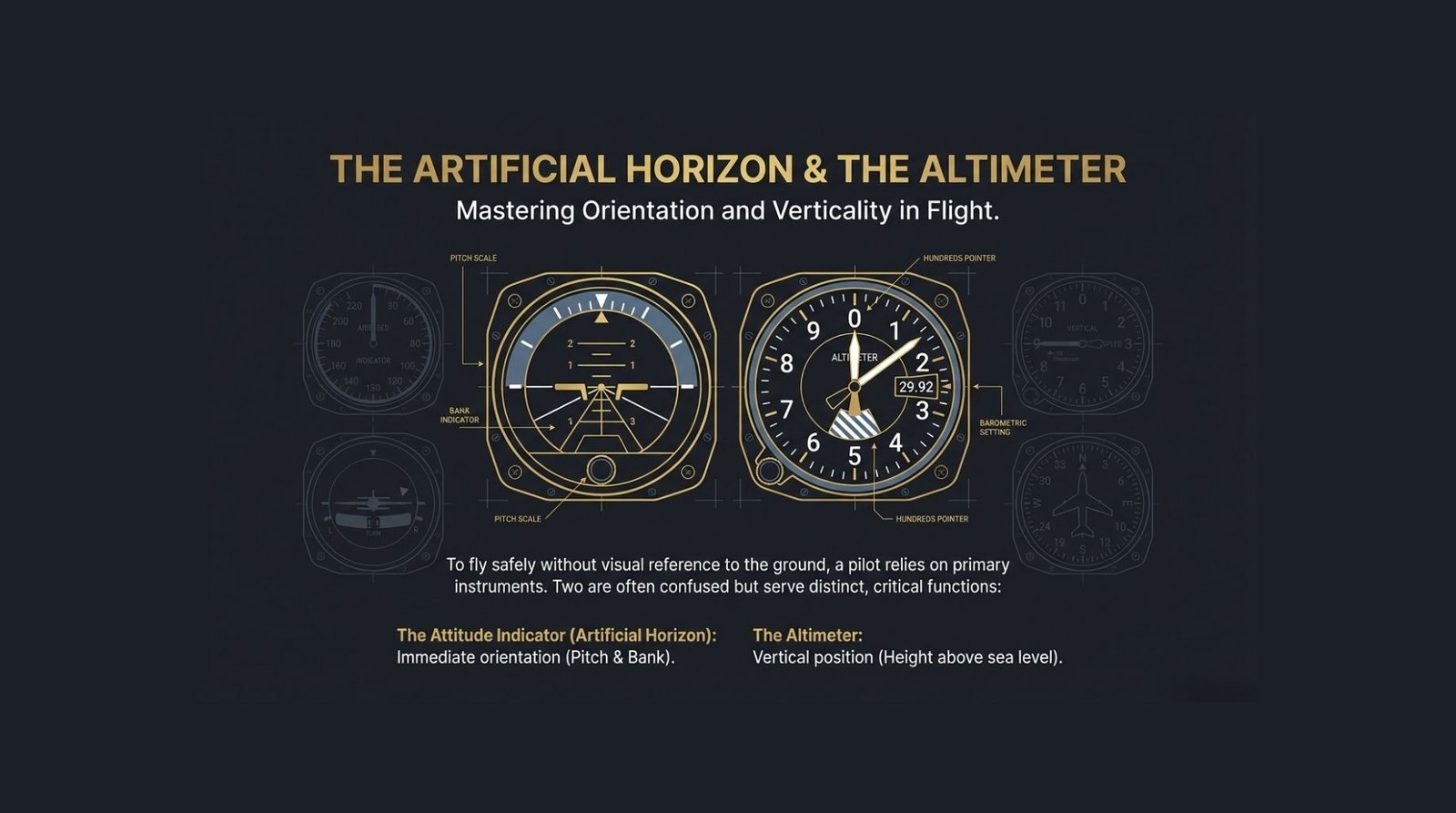
The attitude indicator (AI), colloquially known as the “artificial horizon,” is the centerpiece of the primary flight instrument “six-pack.” Its mission is to provide an immediate, pictorial representation of the aircraft’s pitch and bank relative to the Earth’s horizon.
Among your flight deck tools, the attitude indicator is unique; it is the only instrument providing instantaneous, combined pitch and bank information. While federal regulations do not mandate an AI for flight under Visual Flight Rules (VFR), attempting to fly in marginal visibility without a functional artificial horizon is a recipe for Spatial Disorientation. For Instrument Flight Rules (IFR) operations, this instrument is a regulatory and safety-critical requirement.
2. The Anatomy of the Instrument: Visual Components
Traditional “steam gauge” attitude indicators utilize a standardized visual language to keep you oriented when the natural horizon disappears.
- The Miniature Aircraft: This symbol is fixed to the instrument case, representing the aircraft’s wings and nose. It moves with the cockpit against the stable background.
- The Artificial Horizon Line: A horizontal line separating the display into color-coded hemispheres: blue for sky and brown or black for the ground.
- Pitch Scales: Vertical graduation marks used to measure the nose’s inclination. The long lines represent 10-degree increments, while shorter lines represent 5-degree increments.
- Bank Scale and Pointer: A scale at the top of the instrument with tick marks at 10, 20, 30, 45, 60, and 90 degrees.
- The Red Flag: On many units, a red warning flag will appear if the gyroscope is not receiving sufficient power or vacuum suction, indicating the instrument is unreliable and must not be used for navigation.
The Adjustment Knob: A Warning for IMC
The adjustment knob allows you to move the miniature aircraft vertically to align the “wings” with the horizon line, accounting for your specific line of sight or the aircraft’s pitch in level flight. Listen carefully: You should only adjust this on the ground or during straight-and-level flight in VMC (Visual Meteorological Conditions). Improperly adjusting this knob at night or in IMC (Instrument Meteorological Conditions) is dangerous, as you have no external visual references to verify your actual “zero” pitch.
3. The Physics of Flight: Internal Mechanics
Mechanical attitude indicators rely on a gyroscope mounted horizontally in a system of gimbals. This rotor spins at high speeds, typically powered by air from a Suction (vacuum) system or an electric motor.
Gyroscopic Principles
- Rigidity in Space: This is the primary principle. A high-speed spinning rotor resists changes to its orientation. This allows the gyro to stay level with the Earth’s horizon while the aircraft gimbals—and the instrument case attached to it—maneuver around the stable rotor.
- Precession: The secondary principle where a force applied to a spinning rotor is felt 90 degrees ahead in the direction of rotation. Internal friction and maneuvers cause precession, which manifests as minor instrument errors over time.
4. Reading the Instrument: Pitch and Bank Interpretation
Interpreting the AI requires a disciplined scan. Remember: the miniature aircraft is you; the horizon line is the Earth.
Executing the Scan (Active Voice)
- Determine Pitch: Look at the “pipper” (the center dot or tip of the delta) and see where it sits on the pitch scale relative to the horizon.
- Determine Bank Direction: Observe the miniature wings. If the left wing is in the blue, you are banking right.
- Identify Bank Precision: Check the pointer at the top against the degree increments for an exact angle.
- Monitor Load Factor: Be aware that your bank angle is directly related to Load Factor. Steep turns increase G-loading; do not exceed your aircraft’s limits to avoid an “over-G” structural failure.
Sky Pointers vs. Standard Indicators
In a Sky Pointer system, the pointer remains fixed “up” toward the sky while the scale itself rotates. This can be counter-intuitive for students because the pointer appears to move opposite to the turn. Rule of Thumb: Use the miniature aircraft to determine the direction of the bank and use the pointer only for the precision of the angle.
Operational Limits
The AI shows orientation, not performance. It indicates bank, but not necessarily a turn (verify with the turn coordinator). It indicates pitch, but not necessarily a climb or descent (verify with the VSI and Altimeter).
5. Limitations, Errors, and Instrument “Tumbling”
Traditional gyros have mechanical stops. If you exceed these, the gimbals hit the stops, and the gyro “tumbles,” causing the horizon card to spin violently.
Operational Limits of Gyroscopic Attitude Indicators
| Parameter | Traditional Limits | Modern Mechanical Limits |
| Pitch | 60° to 70° | Up to 85° |
| Bank | 100° to 110° | No Limit / 360° |
Operational Features and Errors
- The Caging Knob: Some electric AIs feature a caging knob. Use this to lock the gyro during high-maneuver flight to prevent tumbling or to quickly realign the horizon card after the gyro has toppled. Realign only in straight-and-level flight.
- Apparent Wander: Because the Earth rotates at 15° per hour, a gyro rigid in space will appear to drift. This error is maximum at the equator and minimum at the poles.
- Correction Systems: To fight wander and precession, Suction-driven instruments use pendulous vanes, while electric models use torque motors to constantly “erect” the gyro toward gravity.
6. The Digital Evolution: Glass Cockpits and AHRS
Modern “Glass Cockpit” displays have largely replaced mechanical gyros with AHRS (Attitude and Heading Reference System).
Using solid-state accelerometers and ring laser gyros, AHRS offers:
- Reliability: No moving parts to wear out or suffer friction-induced precession.
- Invulnerability to Tumbling: Digital sensors lack mechanical stops, providing reliable data even in extreme unusual attitudes.
- Enhanced Situational Awareness: On a PFD (Primary Flight Display), the horizon line often spans the entire screen, making it easier to see in the pilot’s peripheral vision.
7. Supplemental Instrument: The Altimeter
While the AI tracks your attitude, the altimeter tracks your altitude. It is an aneroid barometer calibrated to display feet.
- Pressure Lapse Rate: Standard air pressure drops approximately 1 inch of mercury per 1,000 feet.
- Kollsman Window: You must adjust your altimeter to the local pressure setting to ensure vertical separation from other aircraft.
- Temperature Errors: Cold air is denser and “contracts” the atmosphere. When flying through cold air, the actual pressure levels are lower than in a standard atmosphere. If you maintain a constant indicated altitude on the altimeter, you are actually following those contracted pressure levels toward the terrain. Remember the Golden Rule: “High to Low (Pressure or Temperature), Look Out Below.”
8. Conclusion: The Pilot’s Responsibility
The attitude indicator is your primary lifeline in the clouds, but you must respect its limitations. A vacuum pump failure, a cold temperature error on the altimeter, or a tumbled gyro can lead to fatal consequences if not detected.
As a professional pilot, your responsibility is to maintain absolute situational awareness by constantly cross-checking your “six-pack.” Never rely on a single instrument; verify your AI against the turn coordinator, VSI, and altimeter. Mastery of these internal mechanics is what separates a passenger from a pilot.